[draft] Making VMs Talk Over Emulated UART
TL;DR: I didn’t have ESP32 boards to test my token passing protocol (silly_proto v1), so I simulated them. QEMU’s -serial option can redirect an emulated ESP32’s UART to a TCP socket, so I wrote a runner that acts as a central TCP proxy. It forwards the master’s output to every slave and the slaves’ output back to the master. The runner also builds and starts the nodes and shows each one in its own tmux pane, so I can test a whole network with a single command.
Context
I’m a physically lazy person, so when I needed to run and test my silly_proto v1 which runs on ESP32 (and communicates using UART), I didn’t want to bother actually acquiring the equipment needed to run the network (although I would really benefit from doing this once). This is my effort to simulate ESP32 machines, and make them talk.
A Little About the “Silly Proto v1”
Silly proto is the first version (out of 2) of my token passing protocol which targets RS-485 networks. The assumed network is the full duplex network topology defined by RS-485.
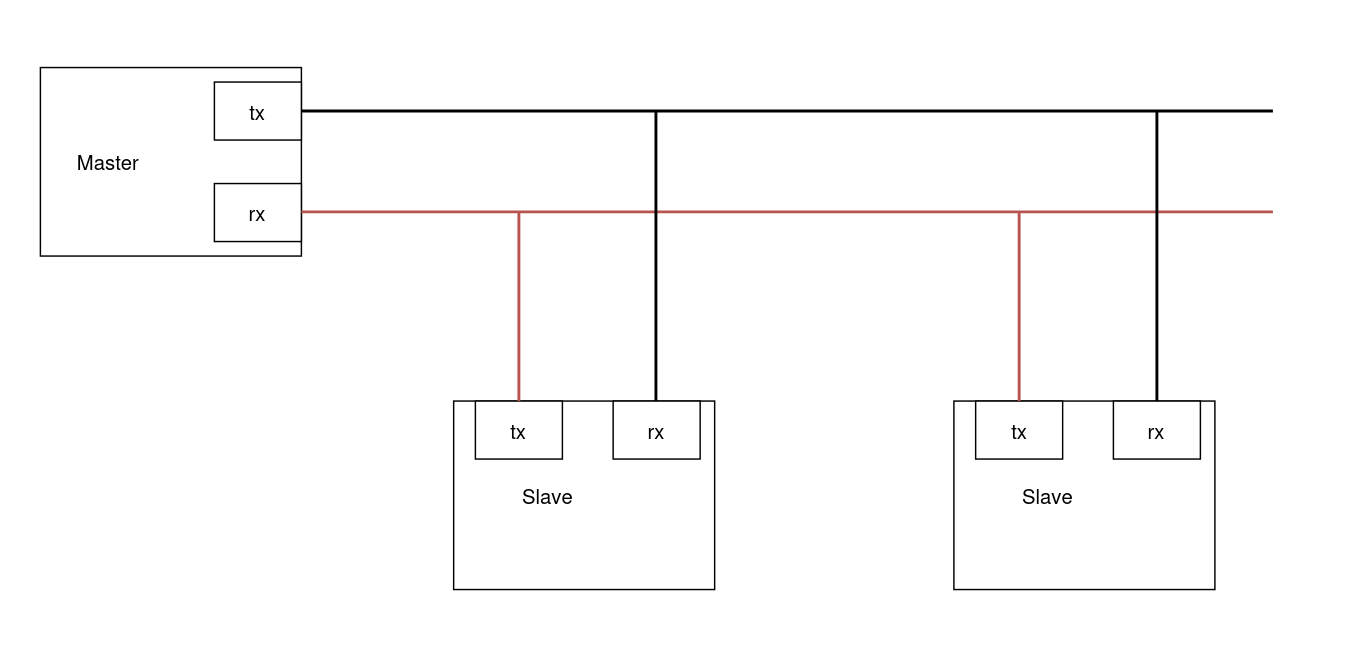
In this topology, we have a reliable master to whom all slaves can talk (but not to each other), and the master can talk to all slaves, at the same time. Master decides which slave can take over the shared transmission line, and sends them the token, and slaves act accordingly. Since the tx line of the master is not shared with slaves, master can give feedback to all slaves without interrupting anything.
Making Two Devices Talk: Loop Back Attempt
I wanted to start simple, and make a node to talk to itself. I had the genius idea of trying to make a loop back interface with the GPIO alone (no wires). Why did I think it’ll work? Well when you simulate everything and don’t touch the hardware, some wrong assumptions are formed in your mind. So, here’s how I thought I can make a loop back interface:
- Configure pin X as tx
- Configure pin X as rx
In my mind, this way the data would go out from X, and come back into the device as input. But in reality, the pin’s configuration is just overwritten to be rx. A correct approach to make this happen would be to:
- Configure pin X as tx
- Configure pin Y as rx
- Somehow redirect output of X into Y, if the emulator provides such feature
Renode: Describe And Run Multi Node Systems
Next I found out about Renode. Essentially you can describe your multi (or single) node system, and emulate everything. It is used in CI, and is a pretty attractive option if your board is directly supported. As for my case, the ESP32 system is not supported, although it seems to be improving. After some desperate searches, I dropped Renode.
A Promising Feature: QEMU -serial
QEMU is really a beast of an emulator. It provides the option -serial, which connects one UART device of the emulated system to the desired destination. One of them being a TCP socket (can also start a TCP server). We can give the idf.py any QEMU arg we want.
qemu manual: -serial dev: Redirect the virtual serial port to host character device dev.
Connecting Two Nodes
Now we can connect the two devices. One can start a TCP server, and the other connects to it:
Server (nowait means VM should startup normally without waiting for connections):
1
idf.py qemu --qemu-extra-args="-serial tcp:127.0.0.1:5555,server,nowait"
Client:
1
idf.py qemu --qemu-extra-args="-serial tcp:127.0.0.1:5555"
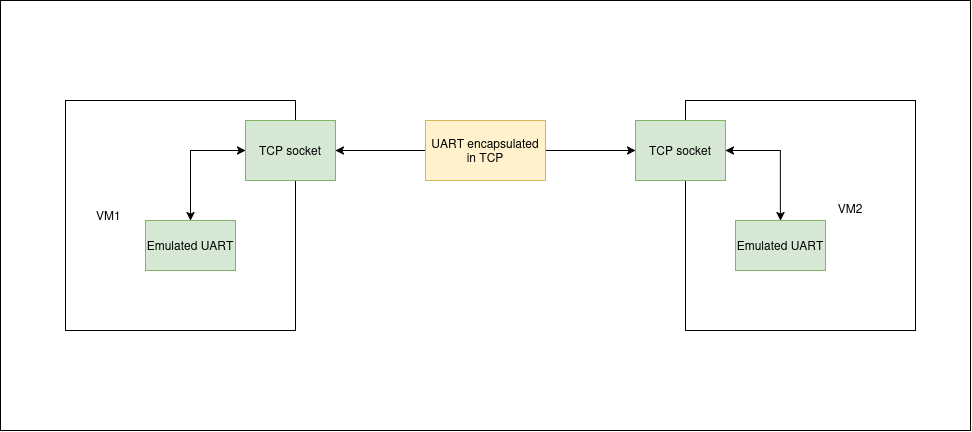
How does QEMU know which serial device to redirect? From what I’ve experienced, it uses the first one that is not used in the command line argument. For example, if you use the -serial option three times, the first time, UART0 is used, UART1 for the second one and so on. But when working with ESP-IDF, since ESP-IDF automatically uses -serial mon:stdio, our -serial usage starts with UART1.
How is UART redirection implemented? I have no idea. But it probably isn’t very complex since QEMU has total control over its emulated devices. I looked for documentation on how exactly UART redirection works, but I had no luck, and also I didn’t understand the source code. I could rebuild the QEMU with tracing options (if available) though.
Connecting Multiple Nodes
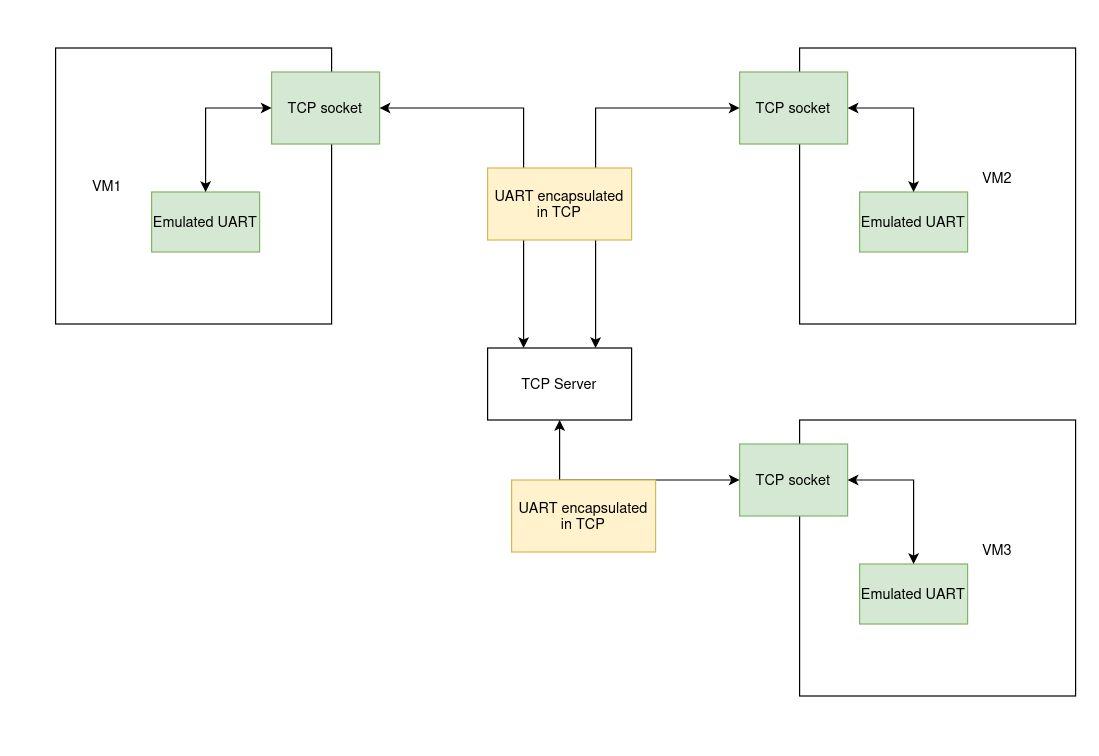
Now that we can connect two nodes, why stop there? We can have a central TCP server that simulates the network topology. Note that our server proxies the data byte by byte, without inspecting it.
The alternative to the byte by byte approach would be parsing packets and then proxying them, which is more complex but would enable us to analyse the traffic of the network, raising alerts when a node is misbehaving, and potentially make a testing framework out of it.
As a reminder, the following is the topology we want to simulate:
In the above topology, our central TCP server needs to:
- Understand which socket belongs to the master
- To achieve this, we can make the master be the first VM to connect to the central server
- Broadcast tx of master to rx of all slaves
- Send tx of slaves to rx of master
- (optional, not in the current implementation): try to detect collision of slave’s tx
Some Automation
It would be tedious if we would have to build and run each virtual node and also give it the address of our central server. What I did instead was to automate almost everything. A custom runner. It would (the f strings are from the runner’s source code):
- build and run the master
- executes this command:
f"{activate_espidf} && cd master && idf.py qemu --qemu-extra-args '-serial tcp:127.0.0.1:{assigned_port}' | tee master.log" - master connects to the runner
- runner now knows which socket is the master
- executes this command:
- build and run the slaves multiple times based on the requested number
- automatically assigns an ID to the slave (out of this post’s scope)
- executes this command:
f"{activate_espidf} && cd slave && idf.py qemu --qemu-extra-args '-serial tcp:127.0.0.1:{assigned_port}' | tee slave_{i}.log" - slave connects to the runner
We also would like to see the output of each node, in a clean way. For this I used libtmux, at the startup of the runner, a tmux session is created and for each node we make a new pane.
Here’s the result. The initial pane (and the left pane when more are added) is the master, others are slaves (source code): 
Wrap up
In this post we managed to get multiple ESP32 virtual machines to talk to each other via a custom runner, which also acts as a TCP proxy server. The nodes talk via UART, which, as far as I understand, on the software level, doesn’t differ much from RS-485 (full duplex topology). This runner made my life so much easier while in development. After each change I could see the result with a single command. This runner can later be turned into a generic tool to network QEMU virtual machines.
Version of Used Software
QEMU (installed via Espressif Installation Manager)
1
2
3
└─$ qemu-system-xtensa --version
QEMU emulator version 9.2.2 (esp_develop_9.2.2_20260417)
Copyright (c) 2003-2024 Fabrice Bellard and the QEMU Project developers
ESP-IDF
1
2
└─$ idf.py --version
ESP-IDF v6.0.3